Recently i worked o a site that needed some modification to the category edit screen in order to display a different image for each category page (it's also implemented in this site).
Now WordPress doesn't have a category or tag meta data table in it's database and i don't know why but i never liked adding tables of my own. So I decided to work with the options table of WordPress. Before i start a side note: this could be done in the same way for categories, tags or any other custom taxonomies but this example will show how to on categories.
Let's get started
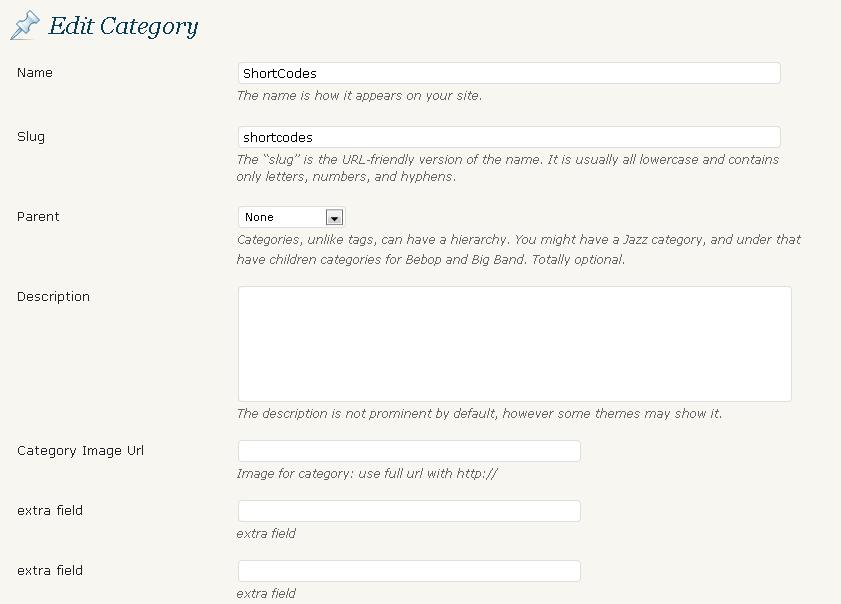
the first thing we need to do is add the extra fields to the category edit form using the hook edit_category_form_fields and we use a simple function that will print out the extra fields.
<?php
//add extra fields to category edit form hook
add_action ( 'edit_category_form_fields', 'extra_category_fields');
//add extra fields to category edit form callback function
function extra_category_fields( $tag ) {	//check for existing featured ID
	$t_id = $tag->term_id;
	$cat_meta = get_option( "category_$t_id");
?>
<tr class="form-field">
<th scope="row" valign="top"><label for="cat_Image_url"><?php _e('Category Image Url'); ?></label></th>
<td>
<input type="text" name="Cat_meta[img]" id="Cat_meta[img]" size="3" style="width:60%;" value="<?php echo $cat_meta['img'] ? $cat_meta['img'] : ''; ?>"><br />
            <span class="description"><?php _e('Image for category: use full url with '); ?></span>
        </td>
</tr>
<tr class="form-field">
<th scope="row" valign="top"><label for="extra1"><?php _e('extra field'); ?></label></th>
<td>
<input type="text" name="Cat_meta[extra1]" id="Cat_meta[extra1]" size="25" style="width:60%;" value="<?php echo $cat_meta['extra1'] ? $cat_meta['extra1'] : ''; ?>"><br />
            <span class="description"><?php _e('extra field'); ?></span>
        </td>
</tr>
<tr class="form-field">
<th scope="row" valign="top"><label for="extra2"><?php _e('extra field'); ?></label></th>
<td>
<input type="text" name="Cat_meta[extra2]" id="Cat_meta[extra2]" size="25" style="width:60%;" value="<?php echo $cat_meta['extra2'] ? $cat_meta['extra2'] : ''; ?>"><br />
            <span class="description"><?php _e('extra field'); ?></span>
        </td>
</tr>
<tr class="form-field">
<th scope="row" valign="top"><label for="extra3"><?php _e('extra field'); ?></label></th>
<td>
        	<textarea name="Cat_meta[extra3]" id="Cat_meta[extra3]" style="width:60%;"><?php echo $cat_meta['extra3'] ? $cat_meta['extra3'] : ''; ?></textarea><br />
            <span class="description"><?php _e('extra field'); ?></span>
        </td>
</tr>
<?php
}
As you can see i added 4 new fields and all of them are in an array Cat_meta[key] because that way we only create on row in the options table to save all of the category's extra fields instead of a row for each field.
Next we need to save the extra fields in to the database once a user submits the category edit form and we do that using "edited_category" with a function that will run through each of the submitted fields and insert them to the database using the update_option function, like this:
<?php
// save extra category extra fields hook
add_action ( 'edited_category', 'save_extra_category_fileds');
   // save extra category extra fields callback function
function save_extra_category_fileds( $term_id ) {
	if ( isset( $_POST['Cat_meta'] ) ) {
		$t_id = $term_id;
		$cat_meta = get_option( "category_$t_id");
		$cat_keys = array_keys($_POST['Cat_meta']);
			foreach ($cat_keys as $key){
			if (isset($_POST['Cat_meta'][$key])){
				$cat_meta[$key] = $_POST['Cat_meta'][$key];
			}
		}
		//save the option array
		update_option( "category_$t_id", $cat_meta );
	}
}
From the code above you can see that all of the extra fields we've added are stored in the database's options table with the name 'category_ID' , where ID is the id of the specific category we just edited and that means we can call this data in our plugins or theme files easily using the get_option function.
say for example my category id is 25 then my code will look like
<?php $cat_data = get_option('category_25'); ?>
As i stated in the beginning of this post i need to display a different image for each category, so in that case i added this few lines of code to my theme's category.php right after the code that displays the category title:
<?php
//first get the current category ID
$cat_id = get_query_var('cat');
//then i get the data from the database
$cat_data = get_option("category_$cat_id");
//and then i just display my category image if it exists
if (isset($cat_data['img'])){
echo '<div class="category_image"><img src="'.$cat_data['img'].'"></div>';
}
Nice and easy and we are all done.
next time I'll show how we add extra fields to custom taxonomies which is pretty much the same but different hook.